Antigravity 配置MCP
在Antigravity中配置MCP
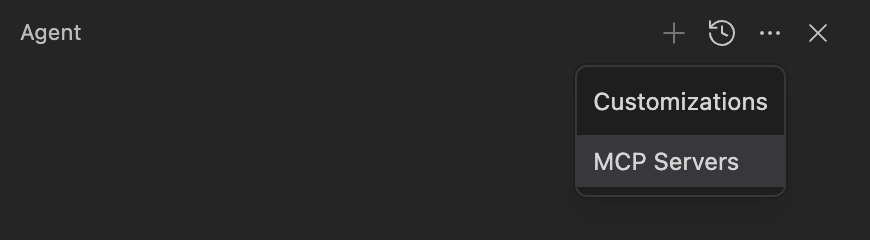
上次配置了Antigravity的github MCP,但是今天提示我MCP没有配置,我需要冲洗你配置,但是忘了如何配置,查询了之后才发现是在Agent窗口上点击右边的 ... 选择MCP Servers后再安装。
例子
配置GitHub MCP可以通过搜索 github,然后点击Install,并且配置Token, 这样就可以直接使用MCP了。
在Antigravity中配置MCP
上次配置了Antigravity的github MCP,但是今天提示我MCP没有配置,我需要冲洗你配置,但是忘了如何配置,查询了之后才发现是在Agent窗口上点击右边的 ... 选择MCP Servers后再安装。

配置GitHub MCP可以通过搜索 github,然后点击Install,并且配置Token, 这样就可以直接使用MCP了。
本文针对“如何在 Git 中忽略已被追踪的配置文件”这一痛点,详细对比了 skip-worktree、assume-unchanged 以及“配置模板法”三种解决方案,助你彻底解决本地数据库配置误提交的烦恼。
Cursor + GitHub MCP: add the GitHub server in Cursor settings, drop in a PAT with repo scope, then just reference an issue number with org/repo. Cursor fetches the details, so I can summarize and fix without pasting issue text.
LLM高质量输出激活词汇表
Restoring a full database backup can seem daunting, but with Percona XtraBackup, it's a straightforward process. This guide walks you through the essential steps to get your MySQL/Percona Server data back up and running from a full backup, ensuring data integrity and a smooth recovery.